
To join our server, enter this address:
secondhaven.apexmc.co
209.192.186.87:25702
More Info
Not sure where to put the address? Don’t worry, we’ve got you! Here’s a step-by-step guide:
You’ve launched Minecraft and clicked Play. Now what? First, select Multiplayer.
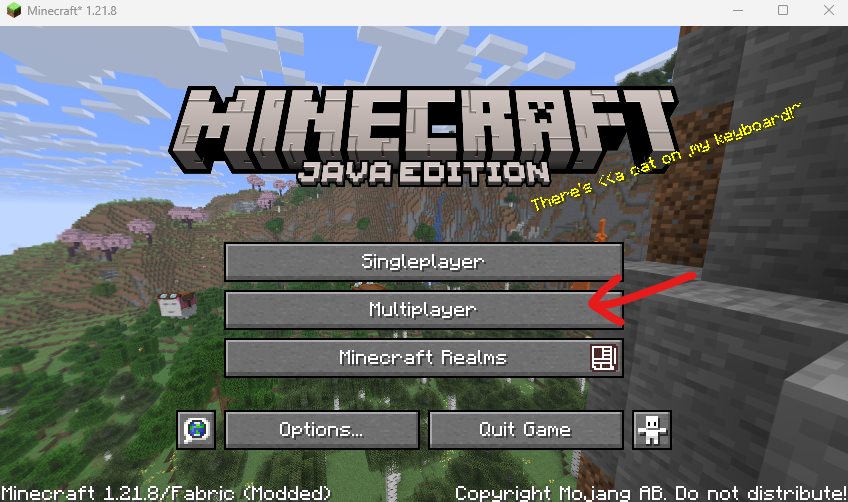
Click Add Server at the bottom of your screen.

Enter the server name and address for Second Haven.
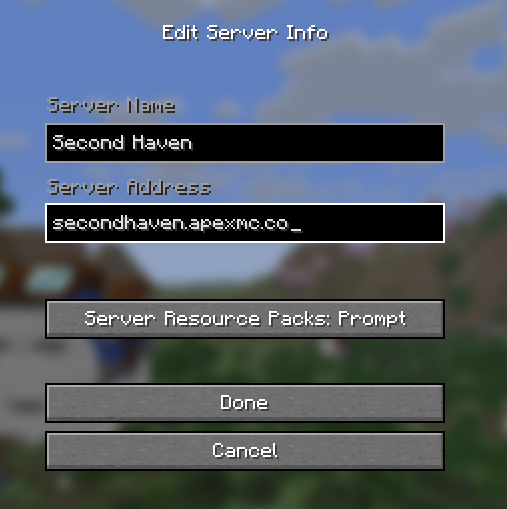
For the Server Address, you can use either of the following:
secondhaven.apexmc.co
209.192.186.87:25702
Then click Done.
Back on the Multiplayer screen, select the Second Haven server. Then click on Join Server.
That’s it! Welcome to our shared world!
If you have any trouble, please reach out to anyone on our team. You can contact us here or in Discord. Need more details? Check out our Step by Step Guide.