
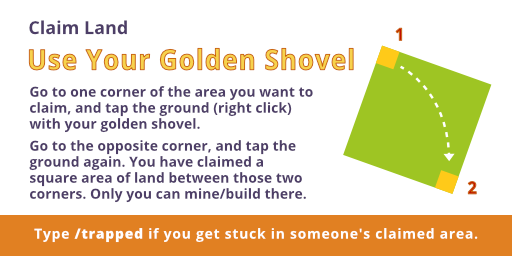
To claim land, use a golden shovel to mark out an area you want to protect. If you hold a stick in your hand and right-click, the border of your claimed land will be highlighted with gold blocks.
Here are the main commands to manage your claim:
/trust [name] – Let a friend build in your land. If you want to give this permission to all players, type /trust all.
/containertrust [name] – Let them open chests and doors. You can also give this permission to all players using /containertrust all.
/accesstrust [name] – Let them use buttons or sleep in a bed.
/abandonclaim – Give up your current land claim. (Stand inside the claim you want to abandon)
/claimslist – Show all the land you own.
/expandclaim [number-of-blocks] – Stand on one border of your claimed land. This command will expland your claim by the number of blocks in the direction of that border. For example, if you stand on the north border and type /expandclaim 10, it will expand your claim ten blocks north.
/trapped – Teleport out if you’re stuck. For example, if you wander into another player’s claimed land, and you fall into a hole, but you can’t break a block to get out, type this command, and after a moment, it will teleport you out of that area.