
The Server Address
To join our world (actually multiple worlds all in one), launch Minecraft and enter this server address:
secondhaven.minecraft.best
or 161.129.180.110
* Bedrock players, use 161.129.180.110 AND port 19132
Where to Enter the Address
Need help? Not sure where to put the server address? Don’t worry, we’ve got you! Here’s a step-by-step guide:
You’ve launched Minecraft and clicked Play. Now what? First, select Multiplayer.
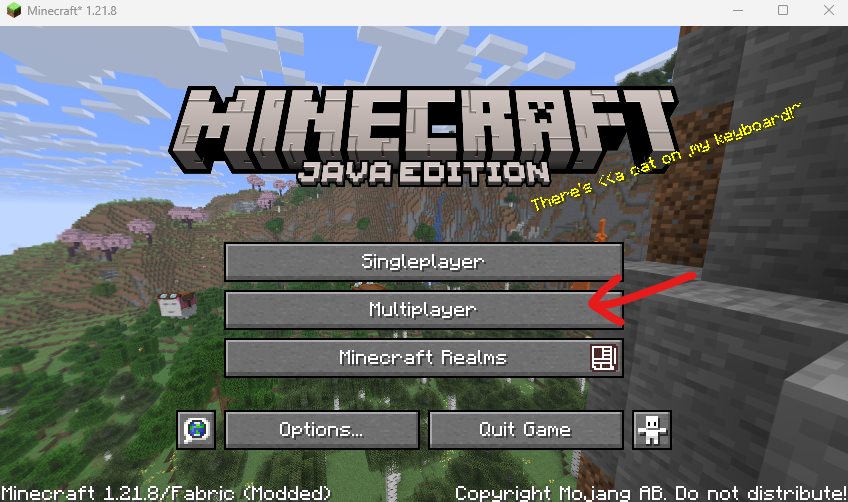
Click Add Server at the bottom of your screen.

Enter the server name and address for Second Haven.
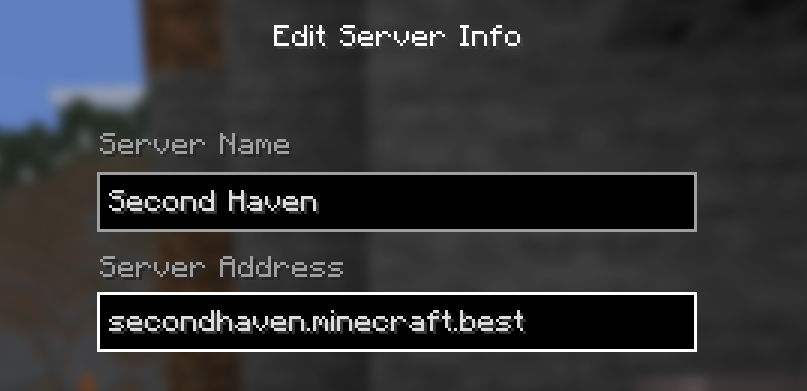
For the Server Address, you can use either of the following:
secondhaven.minecraft.best
161.129.180.110
Then click Done.
Back on the Multiplayer screen, select the Second Haven server. Then click on Join Server.
That’s it! Welcome to our shared world!
If you have any trouble, please reach out to anyone on our team. You can contact us here or in Discord.